Free Launch Bar2.0
Publisher Description
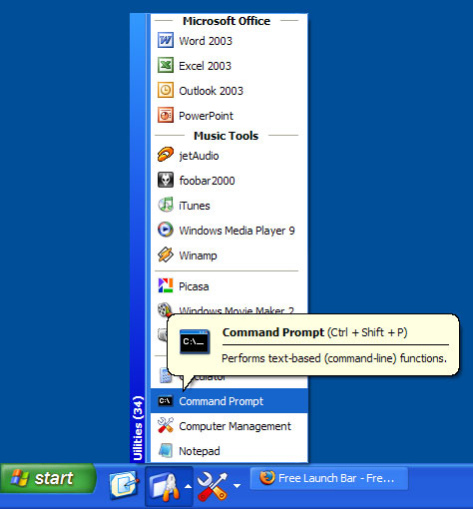
Free Launch Bar is a Free replacement for the standard Quick Launch bar. All functions presented in Quick Launch are also in Free Launch Bar. However, the Free Launch Bar is fully compatible with Quick Launch because it uses the same folder for shortcuts. But there is one huge difference. Free Launch Bar allows you to combine your shortcuts into groups. This feature looks like popup menus. This vastly improves the management of your shortcuts and save working space on your desktop. By using Free Launch Bar, you speed up the launching of your applications like never before.
The main features of Free Launch Bar:
* Creating menu on taskbar with unlimited levels
* Compatibility with Windows XP
* Integration into Windows Shell
* Low resources
* Compatibility with Quick Launch
* Creating separators to group shortcuts inside menus
* Different view modes
* Hotkeys
* Using PNG pictures as icons
* Support of Windows Drag technology. To add shortcuts you can simply drag them into menus
* Improved tips. You can include some of HTML tags into button description.
* Fast toolbar switching
* Absolutely FREE
About Free Launch Bar
This Launchers & Task Managers program is available in English. It was last updated on 29 September, 2026. Free Launch Bar is compatible with the following operating systems: Windows, Windows-mobile.
The company that develops Free Launch Bar is Tordex. The latest version released by its developer is 2.0. This version was rated by 4 users of our site and has an average rating of 3.3.
The download we have available for Free Launch Bar has a file size of 1.0 MB. Just click the green Download button above to start the downloading process. The program is listed on our website since 2009-04-14 and was downloaded 509 times. We have already checked if the download link is safe, however for your own protection we recommend that you scan the downloaded software with your antivirus. Your antivirus may detect the Free Launch Bar as malware if the download link is broken.
How to install Free Launch Bar on your Windows device:
- Click on the Download button on our website. This will start the download from the website of the developer.
- Once the Free Launch Bar is downloaded click on it to start the setup process (assuming you are on a desktop computer).
- When the installation is finished you should be able to see and run the program.
Program Details
System requirements
Download information
Pricing
Version History
version 2.0
posted on 2009-04-14
New release
